I did not realize how incredibly EASY it is to now run LLMs locally on your computer! Two simple steps:
1 – Go to Ollama.com and download/install the app for Mac, Windows, or Linux.
2 – Open a terminal / command shell window and run whatever LLM you want (from Ollama’s list). So to run DeepSeek, you can type this:
ollama run deepseek-r1:7bThat’s it!
After however long it takes to download the model you have chosen and start it up, you’ll get a prompt where you can just start chatting with the LLM as you would at the websites for DeepSeek, ChatGPT or any of the other models:
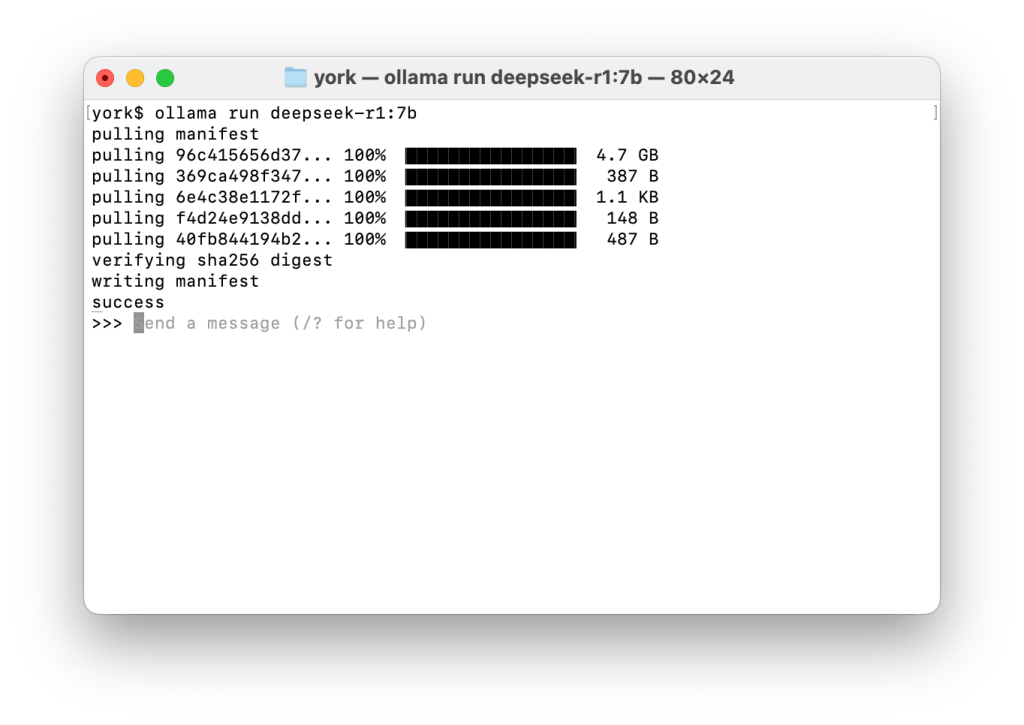
You now have a version of DeepSeek running on your computer. Have fun!
Note that in my example above I’m actually running a “distilled” smaller version of the full DeepSeek model. To run the full model with 671 billion parameters, you would type:
ollama run deepseek-r1:671bThat, however, requires 404 GB of disk space which is far more than my older Mac laptop had available! 🤯
So I went for the 7 billion parameter version that only required 4.7 GB of disk space. If you scroll down the Quick Start page of the documentation to where it says “Model library” you will see a list such as this (current as of March 1, 2025):
| Model | Parameters | Size | Download |
|---|---|---|---|
| DeepSeek-R1 | 7B | 4.7GB | ollama run deepseek-r1 |
| DeepSeek-R1 | 671B | 404GB | ollama run deepseek-r1:671b |
| Llama 3.3 | 70B | 43GB | ollama run llama3.3 |
| Llama 3.2 | 3B | 2.0GB | ollama run llama3.2 |
| Llama 3.2 | 1B | 1.3GB | ollama run llama3.2:1b |
| … and many more… | |||
Now, it may not run as fast on your local computer as it does on the website, but that’s because the sites are powered by ginormous power-sucking data centers with huge numbers of specialized chips! (GPUs) But depending upon your computer, it may be “good enough”.
Why Is This Interesting?
One of my concerns about the latest artificial intelligence (AI) hype cycle with large language models (LLMs) is that in using them on a web site, you are giving the LLM operator all your information that can be used in further training their LLM. And, potentially… could then show up in answers to other people’s prompts.
I don’t want the LLM operator to have any data from me, even if it is just a profile of the kind of things I want to ask about.
And… sometimes I’d like to use a LLM on more private data or information. For instance, while developing a document I intend to later publish. Many companies may not want “internal” or confidential data to be shared with a LLM… that might then use that data for training so that it could show up in someone else’s answers.
The great part about running a LLM locally is that your data STAYS local.
And yes, I’m also just a paranoid “security/privacy guy”! 🤣
The other cool part about this is that for your own personal “resilience”, you can have a LLM available locally if your Internet connection goes down, or if there is a power outage (as long as you can power your computer), or anything else. Having applications locally available is an excellent preparation in uncertain times.
Beyond the Prompt – Using Graphical Clients
But what if you want to do more than just enter in text prompts? The cool part about Ollama being open source is that the community has built MANY clients that work with Ollama! Just look down the long list. There are graphical clients for desktops.. there are web interfaces… terminal clients… cloud integrations… mobile apps… libraries…….. SO MANY THINGS!
I downloaded Ollamac for my Mac and it’s been a great interface for the kind of basic querying that I’m doing.
Next up I’m going to be exploring several that will allow you up upload documents and then have the LLM use those documents as reference. (You could imagine “Write a blog post based on these two reports in the style of these posts” 😀). In the language of LLMs, this is called Retrieval-Augmented Generation (RAG) and so I’ll be exploring the clients that support RAG.
This is all possible because Ollama starts up a server on port 11434 on your local computer to which all of these clients can connect.
There is SO MUCH documentation available that you can easily go down a DEEP rabbit hole once you start! There is the main Github repository and which includes the specific documentation section. There is the Ollama blog. And there are many articles out there. (I’m sure there are also YouTube and TikTok videos, too.)
I hope you all have as much fun with it as I’m having! (And please do send back your comments or suggestions about what you have found most fun or interesting.)
And a tip of the hat to Jim Cowie who wrote about this in one of his posts. I knew it was “easy” to run LLMs locally, but I honestly didn’t know HOW easy until I read Jim’s post!
An “Crow’s Nest” Monthly Video Call?
I’ve been giving a LOT of thought about building communities and connecting with others of similar interests. I’m thinking about the idea of doing a monthly video call (probably using Zoom) for a casual conversation where people could share what kind of emerging technologies they are currently interested in. *IF* I were to set something like that up, would you be interested? Drop an email back to me to let me know (or ping me on Mastodon or LinkedIn).
[The End]
Recent Posts and Podcasts
Content I’ve published and produced recently on my personal sites:
- (none)
Content I’ve published for the Internet Society (who has no connection to this newsletter):
- (none)
(It’s been a rough start to the year for those of us following politics… and I’ve struggled to get back into writing!)
Thanks for reading to the end. I welcome any comments and feedback you may have.
Please drop me a note in email – if you are a subscriber, you should just be able to reply back. And if you aren’t a subscriber, just hit this button 👇 and you’ll get future messages.
This IS also a WordPress hosted blog, so you can visit the main site and add a comment to this post, like we used to do back in glory days of blogging.
Or if you don’t want to do email, send me a message on one of the various social media services where I’ve posted this. (My preference continues to be Mastodon, but I do go on others from time to time.)
Until the next time,
Dan
Connect
The best place to connect with me these days is:
- Mastodon: danyork@mastodon.social
You can also find all the content I’m creating at:
If you use Mastodon or another Fediverse system, you should be able to follow this newsletter by searching for “@crowsnest.danyork.com“
You can also connect with me at these services, although I do not interact there quite as much (listed in decreasing order of usage):
- LinkedIn: https://www.linkedin.com/in/danyork/
- Soundcloud (podcast): https://soundcloud.com/danyork
- Instagram: https://www.instagram.com/danyork/
- Twitch: https://www.twitch.tv/danyork324
- TikTok: https://www.tiktok.com/@danyork324
- Threads: https://www.threads.net/@danyork
- BlueSky: @danyork.bsky.social
Disclaimer
Disclaimer: This newsletter is a personal project I’ve been doing since 2007, several years before I joined the Internet Society in 2011. While I may at times mention information or activities from the Internet Society, all viewpoints are my personal opinion and do not represent any formal positions or views of the Internet Society. This is just me, saying some of the things on my mind.
 A View From The Crow's Nest
Leave a comment